Monday, 29 September 2025

Live Complete SQL Course (Beginner to Advanced)


Format: Live online sessions with hands-on SQL practice, mini-projects, and capstone exercises by industry professionals

Audience: Beginners with no prior knowledge ,basic computer knowledge

Tools Required: MySQL Workbench / PostgreSQL / SQL Server / SQLite (any one), sample database (e.g., Sakila or Northwind), need laptop with an internet connection

Phase 1: Beginner Level (Days 1–5 | 10 Hours)

Day 1: Introduction to Databases & SQL (2 Hours)

  • What is SQL? Why use databases?
  • Relational vs non-relational databases
  • Installing SQL tools, connecting to a database
  • Basic SELECT queries
  • Mini task: retrieve employee records

Day 2: Filtering & Sorting Data (2 Hours)

  • WHERE clause, comparison operators
  • Logical operators: AND, OR, NOT
  • ORDER BY, LIMIT
  • Mini task: filter top-selling products

Day 3: Working with Columns & Expressions (2 Hours)

  • Aliases, arithmetic operations
  • String functions: CONCAT, LENGTH, SUBSTRING
  • Date functions: NOW, DATEPART, DATEDIFF
  • Mini task: format customer contact list

Day 4: Aggregation & Grouping (2 Hours)

  • COUNT, SUM, AVG, MIN, MAX
  • GROUP BY, HAVING
  • Mini task: sales summary by region

Day 5: Joins Basics (2 Hours)

  • INNER JOIN, LEFT JOIN, RIGHT JOIN
  • Joining two tables with keys
  • Mini project: employee-department report
  • Recap and quiz

Phase 2: Intermediate Level (Days 6–10 | 10 Hours)

Day 6: Multi-table Joins & Aliases (2 Hours)

  • Joining 3+ tables
  • Table aliases for readability
  • Mini task: customer order history

Day 7: Subqueries & Nested SELECTs (2 Hours)

  • Subqueries in WHERE, FROM, SELECT
  • Correlated subqueries
  • Mini task: find customers with above-average orders

Day 8: Data Modification (2 Hours)

  • INSERT, UPDATE, DELETE
  • Transactions and COMMIT/ROLLBACK
  • Mini task: update product prices and log changes

Day 9: Constraints & Table Design (2 Hours)

  • PRIMARY KEY, FOREIGN KEY, UNIQUE, NOT NULL
  • Creating tables with constraints
  • Mini task: design normalized schema

Day 10: Intermediate Project (2 Hours)

  • Build a mini database (e.g., bookstore or HR system)
  • Populate, query, and summarize data
  • Recap and quiz

Phase 3: Advanced Level (Days 11–15 | 10 Hours)

Day 11: Views & Indexing (2 Hours)

  • Creating and querying views
  • Indexes: purpose and performance
  • Mini task: create reusable views for reporting

Day 12: Stored Procedures & Functions (2 Hours)

  • Creating stored procedures
  • User-defined functions
  • Mini task: procedure for monthly sales report

Day 13: Advanced Joins & Set Operations (2 Hours)

  • FULL OUTER JOIN, CROSS JOIN
  • UNION, INTERSECT, EXCEPT
  • Mini task: compare customer lists across regions

Day 14: Optimization & Performance (2 Hours)

  • Query optimization techniques
  • EXPLAIN plans, indexing strategy
  • Mini task: optimize slow queries

Day 15: Final Capstone Project & Wrap-up (2 Hours)

  • Full database design + reporting dashboard
  • Advanced queries, views, procedures
  • Final quiz, certification roadmap, career guidance

Here you can see Important Links:-

Cv And Cover Letter Template

Graduate Resume Format

Favorite Resume For Jobs

Monday, 15 September 2025

Live Excel Formulas & Functions Mastery Course


Estimated Duration: 6–7 hours ​

Learning Format: Live session by industry expert ​ ​

Objective: Gain confidence in essential and advanced Excel functions for daily business tasks and reporting

Module Breakdown

Live Session 1: Introduction to Excel Functions ​

  • Topics:
  • Understanding function structure ​
  • Formula best practices ​
  • Duration: 0.5 hours
  • Key Outcome: Build foundational awareness and avoid formula errors ​

Live Session 2: Math & Statistical Functions ​

  • Topics:
  • SUM, AVERAGE, COUNT, ROUND ​
  • COUNTIFS, SUMIFS ​
  • Duration: 1 hour
  • Key Outcome: Perform efficient calculations across large datasets ​

Live Session 3: Logical Functions

  • Topics:
  • IF, IFS, AND, OR, NOT ​
  • Nested conditions
  • Duration: 1 hour
  • Key Outcome: Make smart decisions and filter data logically ​

Live Session 4: Text Manipulation ​

  • Topics:
  • CONCAT, LEFT, RIGHT, MID ​
  • LEN, TRIM, TEXTJOIN ​
  • Duration: 0.75 hours ​
  • Key Outcome: Clean and format text-heavy data ​

Live Session 5: Lookup & Reference Functions ​

  • Topics:
  • VLOOKUP, HLOOKUP ​
  • INDEX-MATCH
  • XLOOKUP (Excel 365) ​
  • Duration: 1.25 hours
  • Key Outcome: Retrieve values accurately across tables ​

Live Session 6: Date & Time Functions ​

  • Topics:
  • TODAY, NOW, EOMONTH ​
  • DATEDIF, NETWORKDAYS ​
  • Duration: 0.75 hours ​
  • Key Outcome: Automate aging analysis and date-related logic ​

Live Session 7: Error Handling & Information Functions ​

  • Topics:
  • IFERROR, ISBLANK, ISNUMBER ​
  • TYPE, INFO ​
  • Duration: 0.5 hours
  • Key Outcome: Manage formula errors and improve reliability ​

Live Session 8: Advanced Nested Formulas ​

  • Topics:
  • Combining IF with VLOOKUP ​
  • Multi-layered logic chains ​
  • Duration: 1 hour
  • Key Outcome: Create powerful formulas for complex reporting ​

Live Activities & Practice ​

  • Mini projects:
  • “Employee Grading Sheet” ​
  • “Sales Region Lookup” ​
  • Quiz after every 2 sessions ​

This format ensures clarity and engagement while highlighting the course’s value and structure.

Here you can see Important Links:-

Professionals In Resume Making

Top Curriculum Vitae For Career

Resume Creative For Job

Thursday, 11 September 2025

Difference Between AI created Resume vs Professional Resume


In today’s competitive job market, a well-crafted resume is essential for standing out. With advancements in technology, job seekers now have the option to use AI tools to build their resumes or to hire professional resume writers. Both approaches have their unique advantages and drawbacks. This essay explores the key differences between AI-built resumes and those created by professionals.

1. Personalization and Customization

One of the primary differences between AI-built resumes and those crafted by professionals is the level of personalization. AI tools use algorithms to generate resumes based on input data, often following a standardized format. While this can ensure consistency and adherence to industry norms, it may lack the personal touch that a professional writer can provide. Professional resume writers take the time to understand the individual’s career goals, experiences, and unique strengths, tailoring the resume to highlight these aspects effectively.

2. Understanding of Industry Nuances

Professional resume writers often have a deep understanding of specific industries and job markets. They are aware of the latest trends, keywords, and expectations of hiring managers in various fields. This expertise allows them to craft resumes that are not only well-written but also strategically aligned with the target job. On the other hand, AI tools may not always capture these nuances, potentially leading to generic resumes that might not stand out in a competitive job market.

3. Quality of Writing and Presentation

The quality of writing and presentation is another area where professional resume writers excel. They possess strong writing skills and an eye for detail, ensuring that the resume is free from grammatical errors and is visually appealing. AI tools, while efficient, may not always produce flawless results. Automated systems can sometimes misinterpret data or fail to present information in the most compelling way, which can be a disadvantage for job seekers.

4. Time and Cost Efficiency

AI-built resumes are typically faster and more cost-effective than hiring a professional writer. For individuals on a tight budget or those who need a resume quickly, AI tools can be a convenient option. They can generate a resume in minutes, whereas a professional writer might take several days to complete the task. However, the investment in a professional writer can pay off in the long run, especially if it leads to better job opportunities.

5. Feedback and Iteration

Professional resume writers often provide personalized feedback and allow for iterations based on the client’s input. This collaborative process ensures that the final resume accurately reflects the individual’s career story and aspirations. AI tools, while efficient, may not offer the same level of interaction and customization. Once the resume is generated, there may be limited options for refinement and adjustment.

Conclusion

Both AI-built resumes and professionally crafted resumes have their merits. AI tools offer speed, cost efficiency, and consistency, making them suitable for those who need a quick solution. However, for job seekers looking for a highly personalized, industry-specific, and meticulously crafted resume, professional resume writers are the better choice. Ultimately, the decision depends on the individual’s needs, budget, and career goals

Here you can see Important Links:-

Resume Creative For Job

Resume Cv Templates In Demand

Cv Format For Jobs


Tuesday, 9 September 2025

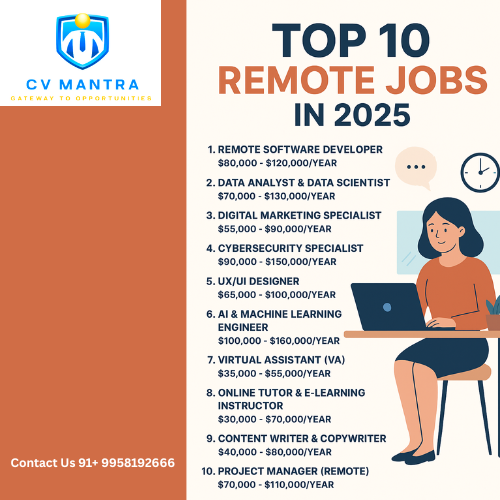
Top 10 Remote Jobs in 2025 That Pay Well


The world of work has changed forever. In 2025, remote jobs are no longer just an option — they’re the future of work. With more companies offering flexibility, young professionals, students, and career switchers are asking: Which remote jobs pay the best in 2025?

At CV Mantra, we’ve researched the most in-demand, high-paying remote jobs that you can do from home or anywhere in the world. Let’s dive into the Top 10 remote jobs in 2025 that offer great salaries and career growth.

1. Remote Software Developer

  • Average Salary: $80,000 — $120,000/year
  • Developers are the backbone of the digital economy. From web apps to mobile solutions, software engineers are always in demand.
  • Skills Needed: Python, JavaScript, Cloud Computing, Git.

If you need help in learning these skills Live Complete Python Programming Course | CV Mantra

2. Data Analyst & Data Scientist

  • Average Salary: $70,000 — $130,000/year
  • Data is the new oil. Businesses need analysts to interpret insights and data scientists to build predictive models.
  • Skills Needed: SQL, Python, Power BI, Machine Learning.

To upskill yourself visit our courses section CV Mantra

3. Digital Marketing Specialist

  • Average Salary: $55,000 — $90,000/year
  • Every business needs digital visibility. Specialists in SEO, paid ads, and social media are highly sought after.
  • Skills Needed: SEO, SEM, Google Analytics, Content Marketing.

To upskill yourself,visit our courses section. Courses — CV Mantra

4. Cybersecurity Specialist

  • Average Salary: $90,000 — $150,000/year
  • With cybercrime growing, protecting data and networks is critical. Cybersecurity experts are among the highest-paid remote workers.
  • Skills Needed: Ethical Hacking, Cloud Security, Risk Management.
  • These are the future job skills that are available to upskill yourself. VisitCourses — CV Mantra

5. UX/UI Designer

  • Average Salary: $65,000 — $100,000/year
  • User experience is everything. Remote designers craft interfaces that are simple, elegant, and engaging.
  • Skills Needed: Figma, Adobe XD, Wireframing, Prototyping.

6. AI & Machine Learning Engineer

  • Average Salary: $100,000 — $160,000/year
  • The rise of AI in 2025 has made ML engineers one of the most in-demand professions. They design algorithms that power intelligent systems.
  • Skills Needed: Python, TensorFlow, NLP, Deep Learning.

7. Virtual Assistant (VA)

  • Average Salary: $35,000 — $55,000/year
  • Many businesses outsource admin tasks to remote VAs. From scheduling to handling emails, it’s a flexible career choice.
  • Skills Needed: MS Office, Communication, Organization.
  • These are the future job skills that are available to upskill yourself. Visit Courses — CV Mantra

Thursday, 4 September 2025

Live Advanced SQL for Scalable Data Systems


Mode: Live workshop conducted by industry experts via Zoom or Meet
Ideal For: 
Experienced SQL users, data professionals, and software engineers
Duration: 
18–20 hours
Prerequisite: 
Completion of beginner-level SQL or equivalent experience

Live Module 1: Advanced Query Techniques

  • Subqueries and nested SELECT statements
  • Correlated subqueries and anti-joins
  • Common Table Expressions (CTEs) and recursive queries

Live Module 2: Stored Procedures & Functions

  • Creating and invoking stored procedures
  • User-defined functions (scalar and table-valued)
  • Use cases for automation and reporting
  • Basic error handling in procedures

Live Module 3: Performance Optimization

  • Indexing: clustered vs non-clustered indexes
  • Query execution plans and interpretation
  • SQL tuning tips: minimizing scans, optimizing joins
  • Using EXPLAIN and ANALYZE

Live Module 4: Data Integrity & Constraints

  • Advanced constraint management: CHECK, DEFAULT, custom logic
  • Views: updatable vs read-only views
  • Triggers for audit trails and business rules

Live Module 5: Transactions & Security

  • Transaction isolation levels: READ COMMITTED, SERIALIZABLE, etc.
  • Locking mechanisms and deadlocks
  • Role-based access control and permissions
  • Auditing and secure query practices

Live Module 6: Real-World Project & Evaluation

  • Project: Design and optimize a database for a job portal or e-commerce dashboard
  • Submit: Stored procedures, queries, and ERD (Entity Relationship Diagram)
  • Final quiz + peer-reviewed project presentation

More Link About :-

Resume For Freshers

Professionals In Resume Making

Top Curriculum Vitae For Career

Market Fit Resume

Live Online Apache Flink Course for Data Analytics

  https://cvmantra.com/product/live-online-apache-flink-course-for-data-analytics/ Duration: 4 Weeks | Total Time: 40 Hours Format: Live o...